Google Ads


Posted in Uncategorized | Comments Off

The new face detection and Processing

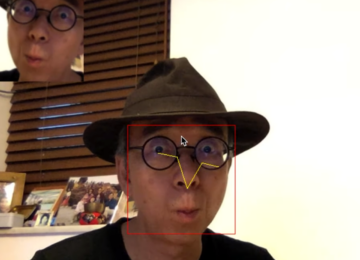
Here is the slightly modified version of the OpenCV Java tutorial example with face detection, ported to Processing.

import processing.video.*;
 
import org.opencv.core.Core;
import org.opencv.core.Mat;
import org.opencv.core.MatOfRect;
import org.opencv.core.Point;
import org.opencv.core.Rect;
import org.opencv.core.Scalar;
import org.opencv.core.CvType;
import org.opencv.core.Size;
import org.opencv.objdetect.CascadeClassifier;
 
import java.awt.image.BufferedImage;
import java.awt.image.WritableRaster;
import java.awt.image.Raster;
 
Capture cap;
int pixCnt;
BufferedImage bm;
 
CascadeClassifier faceDetector;
MatOfRect faceDetections;
 
void setup() {
  size(640, 480);
  System.loadLibrary(Core.NATIVE_LIBRARY_NAME);
  println(Core.VERSION);
 
  cap = new Capture(this, width, height);
  cap.start();
  bm = new BufferedImage(width, height, BufferedImage.TYPE_4BYTE_ABGR);
  pixCnt = width*height*4;
 
  faceDetector = new CascadeClassifier(dataPath("haarcascade_frontalface_default.xml"));
  faceDetections = new MatOfRect();
}
 
void convert(PImage _i) {
  bm.setRGB(0, 0, _i.width, _i.height, _i.pixels, 0, _i.width);
  Raster rr = bm.getRaster();
  byte [] b1 = new byte[pixCnt];
  rr.getDataElements(0, 0, _i.width, _i.height, b1);
  Mat m1 = new Mat(_i.height, _i.width, CvType.CV_8UC4);
  m1.put(0, 0, b1);
 
  Mat m2 = new Mat(_i.height, _i.width, CvType.CV_8UC1);
  Imgproc.cvtColor(m1, m2, Imgproc.COLOR_BGRA2GRAY);   
 
  faceDetector.detectMultiScale(m2, faceDetections, 3, 1, 
  Objdetect.CASCADE_DO_CANNY_PRUNING, new Size(40, 40), new Size(240, 240));
 
  bm.flush();
  m2.release();
  m1.release();
}
 
void draw() {
  if (!cap.available()) 
    return;
  background(0);
  cap.read();
  convert(cap);
  image(cap, 0, 0);
  for (Rect rect: faceDetections.toArray()) {
    noFill();
    stroke(255, 0, 0);
    rect(rect.x, rect.y, rect.width, rect.height);
  }
}
Posted in Software | Tagged , | Leave a comment

OpenCV 2.4.4 and Processing

The latest OpenCV 2.4.4 supports the desktop version of Java. We can use the OpenCV functions in the Processing environment. Before we write a library for it, we can temporarily test it by putting the opencv-244.jar and libopencv_java244.dylib into the code folder of your sketch. For Windows, the dll file should go there as well.

And we also need to perform conversion between the PImage and the OpenCV Mat. I do not want to loop through the pixels array to use bitwise operations. In this case, I use the Java BufferedImage and WritableRaster classes with the 8 bits and 4 channels standard format.

Here are the example codes that perform the GaussianBlur and Canny functions.

import processing.video.*;
 
import org.opencv.core.Core;
import org.opencv.core.Mat;
import org.opencv.core.CvType;
import org.opencv.core.Size;
 
import java.awt.image.BufferedImage;
import java.awt.image.WritableRaster;
import java.awt.image.Raster;
 
Capture cap;
int pixCnt;
BufferedImage bm;
PImage img;
 
void setup() {
  size(640, 480);
  System.loadLibrary(Core.NATIVE_LIBRARY_NAME);
  println(Core.VERSION);
 
  cap = new Capture(this, width, height);
  cap.start();
  bm = new BufferedImage(width, height, BufferedImage.TYPE_4BYTE_ABGR);
  img = createImage(width, height, ARGB);
  pixCnt = width*height*4;
}
 
void convert(PImage _i) {
  bm.setRGB(0, 0, _i.width, _i.height, _i.pixels, 0, _i.width);
  Raster rr = bm.getRaster();
  byte [] b1 = new byte[pixCnt];
  rr.getDataElements(0, 0, _i.width, _i.height, b1);
  Mat m1 = new Mat(_i.height, _i.width, CvType.CV_8UC4);
  m1.put(0, 0, b1);
 
  Mat m2 = new Mat(_i.height, _i.width, CvType.CV_8UC1);
  Imgproc.cvtColor(m1, m2, Imgproc.COLOR_BGRA2GRAY);   
 
  Imgproc.GaussianBlur(m2, m2, new Size(7, 7), 1.5, 1.5);
  Imgproc.Canny(m2, m2, 0, 30, 3, false);
  Imgproc.cvtColor(m2, m1, Imgproc.COLOR_GRAY2BGRA);
 
  m1.get(0, 0, b1);
  WritableRaster wr = bm.getRaster();
  wr.setDataElements(0, 0, _i.width, _i.height, b1);
  bm.getRGB(0, 0, _i.width, _i.height, img.pixels, 0, _i.width);
  img.updatePixels();
  bm.flush();
  m2.release();
  m1.release();
}
 
void draw() {
  if (cap.available()) {
    background(0);
    cap.read();
    convert(cap);
    image(img, 0, 0);
  }
}


Posted in Software | Tagged , | Leave a comment

Kinect in Windows for Processing 5

This is a more or less finished version of the Kinect for Processing library. It includes the basic skeleton tracking, the RGB image, depth image and a mask image. I shall move the related posts to the research page with more documentation on the data structure and method description. Stay tune.


The sample Processing code:

import pKinect.PKinect;
import pKinect.SkeletonData;
 
PKinect kinect;
PFont font;
ArrayList<SkeletonData> bodies;
PImage img;
 
void setup()
{
  size(640, 480);
  background(0);
  kinect = new PKinect(this);
  bodies = new ArrayList<SkeletonData>();
  smooth();
  font = loadFont("LucidaSans-18.vlw");
  textFont(font, 18);
  textAlign(CENTER);
  img = loadImage("background.png");
}
 
void draw()
{
  background(0);
  image(kinect.GetImage(), 320, 0, 320, 240);
  image(kinect.GetDepth(), 320, 240, 320, 240);
  image(img, 0, 240, 320, 240);
  image(kinect.GetMask(), 0, 240, 320, 240);
  for (int i=0; i<bodies.size(); i++) 
  {
    drawSkeleton(bodies.get(i));
    drawPosition(bodies.get(i));
  }
}
 
void mousePressed() 
{
  println(frameRate);
}
 
void drawPosition(SkeletonData _s) 
{
  noStroke();
  fill(0, 100, 255);
  String s1 = str(_s.dwTrackingID);
  text(s1, _s.position.x*width/2, _s.position.y*height/2);
}
 
void drawSkeleton(SkeletonData _s) 
{
  // Body
  DrawBone(_s, 
  PKinect.NUI_SKELETON_POSITION_HEAD, 
  PKinect.NUI_SKELETON_POSITION_SHOULDER_CENTER);
  DrawBone(_s, 
  PKinect.NUI_SKELETON_POSITION_SHOULDER_CENTER, 
  PKinect.NUI_SKELETON_POSITION_SHOULDER_LEFT);
  DrawBone(_s, 
  PKinect.NUI_SKELETON_POSITION_SHOULDER_CENTER, 
  PKinect.NUI_SKELETON_POSITION_SHOULDER_RIGHT);
  DrawBone(_s, 
  PKinect.NUI_SKELETON_POSITION_SHOULDER_CENTER, 
  PKinect.NUI_SKELETON_POSITION_SPINE);
  DrawBone(_s, 
  PKinect.NUI_SKELETON_POSITION_SHOULDER_LEFT, 
  PKinect.NUI_SKELETON_POSITION_SPINE);
  DrawBone(_s, 
  PKinect.NUI_SKELETON_POSITION_SHOULDER_RIGHT, 
  PKinect.NUI_SKELETON_POSITION_SPINE);
  DrawBone(_s, 
  PKinect.NUI_SKELETON_POSITION_SPINE, 
  PKinect.NUI_SKELETON_POSITION_HIP_CENTER);
  DrawBone(_s, 
  PKinect.NUI_SKELETON_POSITION_HIP_CENTER, 
  PKinect.NUI_SKELETON_POSITION_HIP_LEFT);
  DrawBone(_s, 
  PKinect.NUI_SKELETON_POSITION_HIP_CENTER, 
  PKinect.NUI_SKELETON_POSITION_HIP_RIGHT);
  DrawBone(_s, 
  PKinect.NUI_SKELETON_POSITION_HIP_LEFT, 
  PKinect.NUI_SKELETON_POSITION_HIP_RIGHT);
 
  // Left Arm
  DrawBone(_s, 
  PKinect.NUI_SKELETON_POSITION_SHOULDER_LEFT, 
  PKinect.NUI_SKELETON_POSITION_ELBOW_LEFT);
  DrawBone(_s, 
  PKinect.NUI_SKELETON_POSITION_ELBOW_LEFT, 
  PKinect.NUI_SKELETON_POSITION_WRIST_LEFT);
  DrawBone(_s, 
  PKinect.NUI_SKELETON_POSITION_WRIST_LEFT, 
  PKinect.NUI_SKELETON_POSITION_HAND_LEFT);
 
  // Right Arm
  DrawBone(_s, 
  PKinect.NUI_SKELETON_POSITION_SHOULDER_RIGHT, 
  PKinect.NUI_SKELETON_POSITION_ELBOW_RIGHT);
  DrawBone(_s, 
  PKinect.NUI_SKELETON_POSITION_ELBOW_RIGHT, 
  PKinect.NUI_SKELETON_POSITION_WRIST_RIGHT);
  DrawBone(_s, 
  PKinect.NUI_SKELETON_POSITION_WRIST_RIGHT, 
  PKinect.NUI_SKELETON_POSITION_HAND_RIGHT);
 
  // Left Leg
  DrawBone(_s, 
  PKinect.NUI_SKELETON_POSITION_HIP_LEFT, 
  PKinect.NUI_SKELETON_POSITION_KNEE_LEFT);
  DrawBone(_s, 
  PKinect.NUI_SKELETON_POSITION_KNEE_LEFT, 
  PKinect.NUI_SKELETON_POSITION_ANKLE_LEFT);
  DrawBone(_s, 
  PKinect.NUI_SKELETON_POSITION_ANKLE_LEFT, 
  PKinect.NUI_SKELETON_POSITION_FOOT_LEFT);
 
  // Right Leg
  DrawBone(_s, 
  PKinect.NUI_SKELETON_POSITION_HIP_RIGHT, 
  PKinect.NUI_SKELETON_POSITION_KNEE_RIGHT);
  DrawBone(_s, 
  PKinect.NUI_SKELETON_POSITION_KNEE_RIGHT, 
  PKinect.NUI_SKELETON_POSITION_ANKLE_RIGHT);
  DrawBone(_s, 
  PKinect.NUI_SKELETON_POSITION_ANKLE_RIGHT, 
  PKinect.NUI_SKELETON_POSITION_FOOT_RIGHT);
}
 
void DrawBone(SkeletonData _s, int _j1, int _j2) 
{
  noFill();
  stroke(255, 255, 0);
  if (_s.skeletonPositionTrackingState[_j1] != PKinect.NUI_SKELETON_POSITION_NOT_TRACKED &&
    _s.skeletonPositionTrackingState[_j2] != PKinect.NUI_SKELETON_POSITION_NOT_TRACKED) {
    line(_s.skeletonPositions[_j1].x*width/2, 
    _s.skeletonPositions[_j1].y*height/2, 
    _s.skeletonPositions[_j2].x*width/2, 
    _s.skeletonPositions[_j2].y*height/2);
  }
}
 
void appearEvent(SkeletonData _s) 
{
  if (_s.trackingState == PKinect.NUI_SKELETON_NOT_TRACKED) 
  {
    return;
  }
  synchronized(bodies) {
    bodies.add(_s);
  }
}
 
void disappearEvent(SkeletonData _s) 
{
  synchronized(bodies) {
    for (int i=bodies.size()-1; i>=0; i--) 
    {
      if (_s.dwTrackingID == bodies.get(i).dwTrackingID) 
      {
        bodies.remove(i);
      }
    }
  }
}
 
void moveEvent(SkeletonData _b, SkeletonData _a) 
{
  if (_a.trackingState == PKinect.NUI_SKELETON_NOT_TRACKED) 
  {
    return;
  }
  synchronized(bodies) {
    for (int i=bodies.size()-1; i>=0; i--) 
    {
      if (_b.dwTrackingID == bodies.get(i).dwTrackingID) 
      {
        bodies.get(i).copy(_a);
        break;
      }
    }
  }
}

You can download the example and the library here.

Posted in Software | Tagged , , | 7 Comments

Kinect for Windows in Processing 4

This is the new version of the Kinect for Processing library using the Kinect for Windows 1.5 SDK. In this version, I only implement the skeleton tracking, without the previous RGB image and depth image yet. For all the field, method and constant names, I try to use the same ones as in the SDK. It can have multiple skeletons and comes with three events:

  • appear (new skeleton enters the screen)
  • disappear (existing skeleton leaves the screen)
  • move (existing skeleton stay in the screen)


Here is the example Processing code.

import pKinect.PKinect;
 
PKinect kinect;
PFont font;
ArrayList<SkeletonData> bodies;
 
void setup()
{
  size(640, 480);
  background(0);
  kinect = new PKinect(this);
  bodies = new ArrayList<SkeletonData>();
  smooth();
  font = loadFont("LucidaSans-18.vlw");
  textFont(font, 18);
  textAlign(CENTER);
}
 
void draw()
{
  fill(0, 0, 0, 16);
  rect(0, 0, width, height);
  for (int i=0; i<bodies.size(); i++) 
  {
    drawSkeleton(bodies.get(i));
    drawPosition(bodies.get(i));
  }
}
 
void drawPosition(SkeletonData _s) 
{
  noStroke();
  fill(0, 255, 255);
  String s1 = str(_s.dwTrackingID);
  text(s1, _s.position.x*width, _s.position.y*height);
}
 
void drawSkeleton(SkeletonData _s) 
{
  // Body
  DrawBone(_s, 
  PKinect.NUI_SKELETON_POSITION_HEAD, 
  PKinect.NUI_SKELETON_POSITION_SHOULDER_CENTER);
  DrawBone(_s, 
  PKinect.NUI_SKELETON_POSITION_SHOULDER_CENTER, 
  PKinect.NUI_SKELETON_POSITION_SHOULDER_LEFT);
  DrawBone(_s, 
  PKinect.NUI_SKELETON_POSITION_SHOULDER_CENTER, 
  PKinect.NUI_SKELETON_POSITION_SHOULDER_RIGHT);
  DrawBone(_s, 
  PKinect.NUI_SKELETON_POSITION_SHOULDER_CENTER, 
  PKinect.NUI_SKELETON_POSITION_SPINE);
  DrawBone(_s, 
  PKinect.NUI_SKELETON_POSITION_SHOULDER_LEFT, 
  PKinect.NUI_SKELETON_POSITION_SPINE);
  DrawBone(_s, 
  PKinect.NUI_SKELETON_POSITION_SHOULDER_RIGHT, 
  PKinect.NUI_SKELETON_POSITION_SPINE);
  DrawBone(_s, 
  PKinect.NUI_SKELETON_POSITION_SPINE, 
  PKinect.NUI_SKELETON_POSITION_HIP_CENTER);
  DrawBone(_s, 
  PKinect.NUI_SKELETON_POSITION_HIP_CENTER, 
  PKinect.NUI_SKELETON_POSITION_HIP_LEFT);
  DrawBone(_s, 
  PKinect.NUI_SKELETON_POSITION_HIP_CENTER, 
  PKinect.NUI_SKELETON_POSITION_HIP_RIGHT);
  DrawBone(_s, 
  PKinect.NUI_SKELETON_POSITION_HIP_LEFT, 
  PKinect.NUI_SKELETON_POSITION_HIP_RIGHT);
 
  // Left Arm
  DrawBone(_s, 
  PKinect.NUI_SKELETON_POSITION_SHOULDER_LEFT, 
  PKinect.NUI_SKELETON_POSITION_ELBOW_LEFT);
  DrawBone(_s, 
  PKinect.NUI_SKELETON_POSITION_ELBOW_LEFT, 
  PKinect.NUI_SKELETON_POSITION_WRIST_LEFT);
  DrawBone(_s, 
  PKinect.NUI_SKELETON_POSITION_WRIST_LEFT, 
  PKinect.NUI_SKELETON_POSITION_HAND_LEFT);
 
  // Right Arm
  DrawBone(_s, 
  PKinect.NUI_SKELETON_POSITION_SHOULDER_RIGHT, 
  PKinect.NUI_SKELETON_POSITION_ELBOW_RIGHT);
  DrawBone(_s, 
  PKinect.NUI_SKELETON_POSITION_ELBOW_RIGHT, 
  PKinect.NUI_SKELETON_POSITION_WRIST_RIGHT);
  DrawBone(_s, 
  PKinect.NUI_SKELETON_POSITION_WRIST_RIGHT, 
  PKinect.NUI_SKELETON_POSITION_HAND_RIGHT);
 
  // Left Leg
  DrawBone(_s, 
  PKinect.NUI_SKELETON_POSITION_HIP_LEFT, 
  PKinect.NUI_SKELETON_POSITION_KNEE_LEFT);
  DrawBone(_s, 
  PKinect.NUI_SKELETON_POSITION_KNEE_LEFT, 
  PKinect.NUI_SKELETON_POSITION_ANKLE_LEFT);
  DrawBone(_s, 
  PKinect.NUI_SKELETON_POSITION_ANKLE_LEFT, 
  PKinect.NUI_SKELETON_POSITION_FOOT_LEFT);
 
  // Right Leg
  DrawBone(_s, 
  PKinect.NUI_SKELETON_POSITION_HIP_RIGHT, 
  PKinect.NUI_SKELETON_POSITION_KNEE_RIGHT);
  DrawBone(_s, 
  PKinect.NUI_SKELETON_POSITION_KNEE_RIGHT, 
  PKinect.NUI_SKELETON_POSITION_ANKLE_RIGHT);
  DrawBone(_s, 
  PKinect.NUI_SKELETON_POSITION_ANKLE_RIGHT, 
  PKinect.NUI_SKELETON_POSITION_FOOT_RIGHT);
}
 
void DrawBone(SkeletonData _s, int _j1, int _j2) 
{
  noFill();
  stroke(255, 200, 0);
  if (_s.skeletonPositionTrackingState[_j1] != PKinect.NUI_SKELETON_POSITION_NOT_TRACKED &&
    _s.skeletonPositionTrackingState[_j2] != PKinect.NUI_SKELETON_POSITION_NOT_TRACKED) {
    line(_s.skeletonPositions[_j1].x*width, 
    _s.skeletonPositions[_j1].y*height, 
    _s.skeletonPositions[_j2].x*width, 
    _s.skeletonPositions[_j2].y*height);
  }
}
 
void appearEvent(SkeletonData _s) 
{
  if (_s.trackingState == PKinect.NUI_SKELETON_NOT_TRACKED) 
  {
    return;
  }
  synchronized(bodies) {
    bodies.add(_s);
  }
  println("appearing ..." + _s.dwTrackingID);
}
 
void disappearEvent(SkeletonData _s) 
{
  synchronized(bodies) {
    for (int i=bodies.size()-1; i>=0; i--) 
    {
      if (_s.dwTrackingID == bodies.get(i).dwTrackingID) 
      {
        bodies.remove(i);
      }
    }
  }
  println("Disappearing ... " + _s.dwTrackingID);
}
 
void moveEvent(SkeletonData _b, SkeletonData _a) 
{
  if (_a.trackingState == PKinect.NUI_SKELETON_NOT_TRACKED) 
  {
    return;
  }
  synchronized(bodies) {
    for (int i=bodies.size()-1; i>=0; i--) 
    {
      if (_b.dwTrackingID == bodies.get(i).dwTrackingID) 
      {
        bodies.get(i).copy(_a);
        break;
      }
    }
  }
}

 
The Processing code and library can be downloaded here.

Posted in Software | Tagged , | Leave a comment

Kinect for Windows in Processing 3

Finally, the skeleton part of the library is done. In this very experimental version, I extract only one skeleton and store the joints information in an array (size 20) of PVector type in Processing. The tracking state is not implemented yet. I use the z-depth value to indicate if that joint is validly tracked or not. The x and y values are normalized to the range from 0 to 1 in the screen space. In the next version, I would like to implement the async event of tracking. It is time to integrate the all three components:

  1. Individual RGB and depth images
  2. Aligned RGB and depth image
  3. Skeleton tracking


Here is a copy of the sample Processing code.

import pKinect.PKinect;
 
PKinect kinect;
PVector [] loc;
 
void setup()
{
  size(640, 480);
  kinect = new PKinect(this);
  smooth();
  noFill();
  stroke(255, 255, 0);
}
 
void draw()
{
  background(0);
  loc = kinect.getSkeleton();
  drawSkeleton();
}
 
void drawSkeleton()
{
  // Body
  DrawBone(kinect.NUI_SKELETON_POSITION_HEAD,
  kinect.NUI_SKELETON_POSITION_SHOULDER_CENTER);
  DrawBone(kinect.NUI_SKELETON_POSITION_SHOULDER_CENTER,
  kinect.NUI_SKELETON_POSITION_SHOULDER_LEFT);
  DrawBone(kinect.NUI_SKELETON_POSITION_SHOULDER_CENTER,
  kinect.NUI_SKELETON_POSITION_SHOULDER_RIGHT);
  DrawBone(kinect.NUI_SKELETON_POSITION_SHOULDER_CENTER,
  kinect.NUI_SKELETON_POSITION_SPINE);
  DrawBone(kinect.NUI_SKELETON_POSITION_SPINE,
  kinect.NUI_SKELETON_POSITION_HIP_CENTER);
  DrawBone(kinect.NUI_SKELETON_POSITION_HIP_CENTER,
  kinect.NUI_SKELETON_POSITION_HIP_LEFT);
  DrawBone(kinect.NUI_SKELETON_POSITION_HIP_CENTER,
  kinect.NUI_SKELETON_POSITION_HIP_RIGHT);
 
  // Left Arm
  DrawBone(kinect.NUI_SKELETON_POSITION_SHOULDER_LEFT,
  kinect.NUI_SKELETON_POSITION_ELBOW_LEFT);
  DrawBone(kinect.NUI_SKELETON_POSITION_ELBOW_LEFT,
  kinect.NUI_SKELETON_POSITION_WRIST_LEFT);
  DrawBone(kinect.NUI_SKELETON_POSITION_WRIST_LEFT,
  kinect.NUI_SKELETON_POSITION_HAND_LEFT);
 
  // Right Arm
  DrawBone(kinect.NUI_SKELETON_POSITION_SHOULDER_RIGHT,
  kinect.NUI_SKELETON_POSITION_ELBOW_RIGHT);
  DrawBone(kinect.NUI_SKELETON_POSITION_ELBOW_RIGHT,
  kinect.NUI_SKELETON_POSITION_WRIST_RIGHT);
  DrawBone(kinect.NUI_SKELETON_POSITION_WRIST_RIGHT,
  kinect.NUI_SKELETON_POSITION_HAND_RIGHT);
 
  // Left Leg
  DrawBone(kinect.NUI_SKELETON_POSITION_HIP_LEFT,
  kinect.NUI_SKELETON_POSITION_KNEE_LEFT);
  DrawBone(kinect.NUI_SKELETON_POSITION_KNEE_LEFT,
  kinect.NUI_SKELETON_POSITION_ANKLE_LEFT);
  DrawBone(kinect.NUI_SKELETON_POSITION_ANKLE_LEFT,
  kinect.NUI_SKELETON_POSITION_FOOT_LEFT);
 
  // Right Leg
  DrawBone(kinect.NUI_SKELETON_POSITION_HIP_RIGHT,
  kinect.NUI_SKELETON_POSITION_KNEE_RIGHT);
  DrawBone(kinect.NUI_SKELETON_POSITION_KNEE_RIGHT,
  kinect.NUI_SKELETON_POSITION_ANKLE_RIGHT);
  DrawBone(kinect.NUI_SKELETON_POSITION_ANKLE_RIGHT,
  kinect.NUI_SKELETON_POSITION_FOOT_RIGHT);
}
 
void DrawBone(int _s, int _e)
{
  if (loc == null)
  {
    return;
  }
  PVector p1 = loc[_s];
  PVector p2 = loc[_e];
  if (p1.z == 0.0 || p2.z == 0.0)
  {
    return;
  }
  line(p1.x*width, p1.y*height, p2.x*width, p2.y*height);
}

This version of the code (for Windows 7, both 32-bit and 64-bit) is available here.

Posted in Software, Testing | Tagged , | Leave a comment

More on GridFlow for Pure Data

Further to the previous post on GridFlow in Pure Data, I include here the installation steps for GridFlow. The Pd Extended package does not include GridFlow. After I download the file from the GridFlow website, I unzip it into the gridflow-9.13 folder. To install, I copy the inside gridflow folder to the following location:

/Library/Pd/

Within Pure Data preference, I add the path and startup option for GridFlow as shown in the following diagrams.

GridFlow path
Startup Option

To continue from the previous post with the integration of GEM and GridFlow, I redo one of my Processing work of slit-scan image in Pure Data. The GridFlow package comes with a similar example.

The source patch of the slit-scan example is:

Slit-scan example
Posted in Software, Testing | Tagged , , | Leave a comment