I manage to compile an OSX version of the library. I use the 10.6 SDK to package the library. You can download the sample application below. I place it temporarily in a code folder.

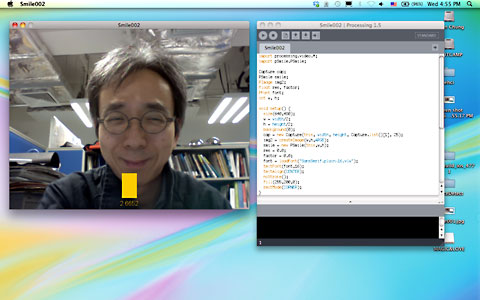
This is the Processing source code for the example.
import processing.video.*; import pSmile.PSmile; Capture cap; PSmile smile; PImage img2; float res, factor; PFont font; int w, h; void setup() { size(640,480); w = width/2; h = height/2; background(0); cap = new Capture(this, width, height, Capture.list()[1], 25); img2 = createImage(w,h,ARGB); smile = new PSmile(this,w,h); res = 0.0; factor = 0.0; font = loadFont("SansSerif.plain-16.vlw"); textFont(font,16); textAlign(CENTER); noStroke(); fill(255,200,0); rectMode(CORNER); } void draw() { img2.copy(cap,0,0,width,height,0,0,w,h); img2.updatePixels(); image(cap,0,0); res = smile.getSmile(img2); if (res>0) { factor = factor*0.8 + res*0.2; float t_h = factor*30; rect(width/2-20,height-t_h-30,40,t_h); } String str = nf(res,1,4); text(str,width/2,height-10); } void captureEvent(Capture _c) { _c.read(); }
The link for the OSX link doesn’t seem to be working for me..tells me that the document is not found on the server
The link is updated now. Thx.
Hey, the link of the application is broken!
The link is now updated. Thanks.
Pingback: My most important Twitter Messages #10 | der hess
I did the Windows version first. Maybe, the Processing Video library for capture is not working well with Winvdig. You can try the jMyron library instead to do video capture in Windows.
Bryan
hey Bryan! this library works in pc/win7?
Yes, I also tested in Windows 7. Nevertheless, I often use the jMyron library for video capture instead of the Quicktime + winvdig standard video library in Processing. It may be the reason. Thanks.
Bryan
Pingback: How much of a smile is a smile? | Meaning in the Mouth
I extracted [Smile002_Processing.zip] into [C:/processing-1.0.3/processing-1.0.3/libraries/] folder, compile the Smile002.pde …. but still get [UnsatisfiedLinkError].
How to solve the
[UnsatisfiedLinkError: C:/processing-1.0.3/processing-1.0.3/libraries/Smile002/code/PSmile.dll: Can't find dependent libraries]
OS Win7, Processing-1.0.3
Thanks.
Hello Bryan!
I got an error while setting up capture on Mac with a massage below.
————————–
quicktime.std.StdQTException[QTJava:7.6.6g],-2090=videoOutputInUseErr,QT.vers:7668000
at quicktime.std.StdQTException.checkError(StdQTException.java:40)
at quicktime.std.sg.SGChannel.setDevice(SGChannel.java:330)
at processing.video.Capture.init(Capture.java:203)
at processing.video.Capture.(Capture.java:154)
at Smile002.setup(Smile002.java:43)
at processing.core.PApplet.handleDraw(PApplet.java:1608)
at processing.core.PApplet.run(PApplet.java:1530)
at java.lang.Thread.run(Thread.java:637)
Exception in thread “Animation Thread” java.lang.RuntimeException: Error while setting up Capture
at processing.core.PApplet.die(PApplet.java:2571)
at processing.core.PApplet.die(PApplet.java:2580)
at processing.video.Capture.init(Capture.java:244)
at processing.video.Capture.(Capture.java:154)
at Smile002.setup(Smile002.java:43)
at processing.core.PApplet.handleDraw(PApplet.java:1608)
at processing.core.PApplet.run(PApplet.java:1530)
at java.lang.Thread.run(Thread.java:637)
————————–
Do I need particular version of quicktime player?
or do you have other solution…?
Thank you for your time!
Hi Steve,
The library is independent of the quicktime version. It seems that you cannot do the capture even without my library. Maybe you can take a look of the processing forum at http://wiki.processing.org/w/Video_Issues
Otherwise, you can try to update to the latest Quicktime and Java for your Mac to have a try again. Thank you.
Bryan
hey bryan
I am having same Library dependency problem and dealing with video capturing error in processing 1.2.1in vista and windows 7 if i dont use Psmile library and exclude its function code is running fine . So i think their problem wid Psmile library dependency plz chek
Hi Bryan,
Unfortunately I could make working your ‘SmileRecognition’. Do you have any suggestion to give me to fix this problem on a pc with Windows XP?
Just to give you information that might be useful to figure out the problem I have installed ‘OpenCV_1.1pre1a.exe’ and I could make working all the openCV examples (http://ubaa.net/shared/processing/opencv/).
processing.app.debug.RunnerException: UnsatisfiedLinkError: C:\Documents and Settings\Filippo\Documenti\Processing\Smile002\code\PSmile.dll: Can’t find dependent libraries
at processing.app.Sketch.placeException(Sketch.java:1543)
at processing.app.debug.Runner.findException(Runner.java:582)
at processing.app.debug.Runner.reportException(Runner.java:558)
at processing.app.debug.Runner.exception(Runner.java:498)
at processing.app.debug.EventThread.exceptionEvent(EventThread.java:367)
at processing.app.debug.EventThread.handleEvent(EventThread.java:255)
at processing.app.debug.EventThread.run(EventThread.java:89)
Exception in thread “Animation Thread” java.lang.UnsatisfiedLinkError: C:\Documents and Settings\Filippo\Documenti\Processing\Smile002\code\PSmile.dll: Can’t find dependent libraries
at java.lang.ClassLoader$NativeLibrary.load(Native Method)
at java.lang.ClassLoader.loadLibrary0(ClassLoader.java:1803)
at java.lang.ClassLoader.loadLibrary(ClassLoader.java:1728)
at java.lang.Runtime.loadLibrary0(Runtime.java:823)
at java.lang.System.loadLibrary(System.java:1028)
at pSmile.PSmile.(PSmile.java:9)
at Smile002.setup(Smile002.java:42)
at processing.core.PApplet.handleDraw(Unknown Source)
at processing.core.PApplet.run(Unknown Source)
at java.lang.Thread.run(Thread.java:619)
Waiting to hear back from you, best regards.
Filippo
Hi Filippo,
It may be missing libraries from Windows platform. I suggest you run Dependency Walker (http://www.dependencywalker.com/) in your computer to check my library PSmile.dll to see which libraries are missing in your machine. I build it in Windows 7 with Visual Studio 2010. Thanks.
Bryan
Hey I’m Getting this Error When i Compiled it Under Windows 7 at line
cap = new Capture(this, width, height, Capture.list()[1], 25);
Exception in thread “Animation Thread” java.lang.ArrayIndexOutOfBoundsException: 1
at Smile002.setup(Smile002.java:40)
at processing.core.PApplet.handleDraw(Unknown Source)
at processing.core.PApplet.run(Unknown Source)
at java.lang.Thread.run(Thread.java:662)
Do U have Any suggestions To Over come This Problem…
Thanks in advance…..
Dear James,
It may be due to the number of webcams in your computer. In the example, I use Capture.list()[1], that is the 2nd webcam in my computer. If you have only one webcam, you can skip this or use Capture.list()[0]. See if it helps. Thanks.
Bryan